Tutorial
These are examples of some basic scans that the user might perform on the high level interface. The examples have run on a virtual instrument defined in a later section. This documentation also serves as a testing basis to ensure that this the code always matches the functionality declared here.
Plot Motor Scan
Our first, simplest example is the user plotting a scan of the detector intensity as the motor moves from 0 to 2 exclusively in steps of 0.6.
>>> populate()
>>> scan(theta, 0, 2, 0.6, 50)
Taking a count at theta=0.00 and two theta=0.00
Taking a count at theta=0.60 and two theta=0.00
Taking a count at theta=1.20 and two theta=0.00
Taking a count at theta=1.80 and two theta=0.00
The above is the simplest possible kind of default scan. The first parameter is the starting point, the second is the stopping point, the third is the step size, and the final parameter is the number of frames to measure at each point. For most cases, it should be sufficient, but there are many more options that can be layered on top.
>>> scan(theta, 0, 2, stride=0.6, frames=10)
Taking a count at theta=0.00 and two theta=0.00
Taking a count at theta=0.50 and two theta=0.00
Taking a count at theta=1.00 and two theta=0.00
Taking a count at theta=1.50 and two theta=0.00
Taking a count at theta=2.00 and two theta=0.00
Above, we’ve not used the default
stepparameter, but did use thestrideparameter instead. Setting thestrideinstead of setting thestepallow the instrument to slightly adjust the step size to ensure that the end point is included in the scan. In this example, the step size was decrease from 0.6 mm to 0.5 mm.Note
Since we skipped the
stepparameter, we had to give theframesparameter by name.The results of all scans are saved to a log file. The location of the log is set by the instrument scientist. The data from the scan above can be seen below.
mock_scan_02.dat¶Theta (deg) Intensity Uncertainty 0.0 0.011609802314883557 0.0003407315998683356 0.5 1.3355252547041758 0.0036544838961256564 1.0 1.5575083427167975 0.003946528021839953 1.5 1.31740610150459 0.003629608934175402 2.0 0.8374813451920249 0.002893926994918885>>> s = scan(theta, 0, 2, 0.6, seconds=1, save="plot_example.png") Taking a count at theta=0.00 and two theta=0.00 Taking a count at theta=0.60 and two theta=0.00 Taking a count at theta=1.20 and two theta=0.00 Taking a count at theta=1.80 and two theta=0.00The
saveargument allows the figure to be saved to a file. Otherwise, the screen will show the plot interactively. Also, notice we’ve given the time for each measuremnt insecondsinstead of frames. The values orminutes,hours, anduampsare also accepted.
There are many possibilities beyond the
start,stop,step, andstridethat have been introduced thus far. For example,countandgapsallow the user to specify the number of measurements and the number of gaps, respectively.>>> scan(theta, start=0, stop=2, count=4, frames=5) Taking a count at theta=0.00 and two theta=0.00 Taking a count at theta=0.67 and two theta=0.00 Taking a count at theta=1.33 and two theta=0.00 Taking a count at theta=2.00 and two theta=0.00 >>> scan(theta, start=0, stop=2, gaps=4, frames=5) Taking a count at theta=0.00 and two theta=0.00 Taking a count at theta=0.50 and two theta=0.00 Taking a count at theta=1.00 and two theta=0.00 Taking a count at theta=1.50 and two theta=0.00 Taking a count at theta=2.00 and two theta=0.00The user also has the option of fixing the steps size and number of measurements or gaps while leaving the ending position open.
>>> scan(theta, start=0, step=0.6, count=5, frames=5)
Taking a count at theta=0.00 and two theta=0.00
Taking a count at theta=0.60 and two theta=0.00
Taking a count at theta=1.20 and two theta=0.00
Taking a count at theta=1.80 and two theta=0.00
Taking a count at theta=2.40 and two theta=0.00
>>> scan(theta, start=0, stride=0.6, gaps=5, frames=5)
Taking a count at theta=0.00 and two theta=0.00
Taking a count at theta=0.60 and two theta=0.00
Taking a count at theta=1.20 and two theta=0.00
Taking a count at theta=1.80 and two theta=0.00
Taking a count at theta=2.40 and two theta=0.00
Taking a count at theta=3.00 and two theta=0.00
For when relative scans make more sense, it’s possible to request them by replacing start and stop with
beforeandafter.>>> scan(theta, before=-1, after=1, stride=0.6, frames=5) Taking a count at theta=2.00 and two theta=0.00 Taking a count at theta=2.50 and two theta=0.00 Taking a count at theta=3.00 and two theta=0.00 Taking a count at theta=3.50 and two theta=0.00 Taking a count at theta=4.00 and two theta=0.00Since relative scans are fairly common, there’s a built in
defaults.Defaults.rscan()method which defaults to a relative scan, instead of an absolute.>>> rscan(theta, -1, 1, 0.5, 5) Taking a count at theta=3.00 and two theta=0.00 Taking a count at theta=3.50 and two theta=0.00 Taking a count at theta=4.00 and two theta=0.00 Taking a count at theta=4.50 and two theta=0.00 >>> theta Theta is at 4.0Note
Some combinations of values do not provide enough information to create a scan. A
RuntimeErrorwill be thrown if a scan cannot be constructed>>> scan(theta, start=0, stop=0.6, after=2) Traceback (most recent call last): ... RuntimeError: Unable to build a scan with that set of options.Given the flexibility of the scanning system, it’s not too difficult to accidentally request a scan that contains no data points. Instead of plotting a pointless scan, the scanning system will raise an exception, as this is almost never what the user intended.
>>> scan(theta, -2, -3, 0.2, 5)
Traceback (most recent call last):
...
RuntimeError: Your requested scan contains no points.  Are you trying to move a negative distance with positive steps?
Motor Objects
We’ve been using the motor object
theta, but we haven’t discussed how it works.>>> theta() 4.0Calling the object with no parameters returns the current position. This position can be changed by giving a new value in the function
>>> THETA()
4.0
>>> Theta()
4.0
The axis can be called by its name in lower case, in upper case, or as case in the IBEX block.
>>> theta(3.0)
>>> theta
Theta is at 3.0
We can also perform some relative changes with Python’s in place operators.
>>> theta += 1.5
>>> theta
Theta is at 4.5
>>> theta -= 4
>>> theta *= 2
>>> theta
Theta is at 1.0
Soft limits can be placed on motors with the low and high properties. Scans that attempt to exceed these values will throw an error.
>>> theta.low = 0
>>> theta.high = 2
>>> scan(theta, start=0, stop=10, count=21)
Traceback (most recent call last):
    ...
RuntimeError: Position 2.5 is above upper limit 2 of motor Theta
>>> theta.high = NoneMotor objects can also get and set the velocity of a motor:
>>> theta.velocity = 20
>>> theta.velocity
20
And find out about the tolerance of a motor:
>>> theta.tolerance
1.5
If there is no Motion object for a specific axis, the user can give the name in a string and use that. If the axis isn’t a string or a Motion object, the scan will fail. Also, the string does not need to match the case of the IBEX block.
>>> scan("Theta", start=0, stop=10, stride=2, frames=5)
Taking a count at theta=0.00 and two theta=0.00
Taking a count at theta=2.00 and two theta=0.00
Taking a count at theta=4.00 and two theta=0.00
Taking a count at theta=6.00 and two theta=0.00
Taking a count at theta=8.00 and two theta=0.00
Taking a count at theta=10.00 and two theta=0.00
>>> scan("theta", start=0, stop=10, stride=2, frames=5) Taking a count at theta=0.00 and two theta=0.00 Taking a count at theta=2.00 and two theta=0.00 Taking a count at theta=4.00 and two theta=0.00 Taking a count at theta=6.00 and two theta=0.00 Taking a count at theta=8.00 and two theta=0.00 Taking a count at theta=10.00 and two theta=0.00>>> scan(True, start=0, stop=10, count=5) # doctest: +NORMALIZE_WHITESPACE Traceback (most recent call last): ... TypeError: Cannot run scan on axis True. Try a string or a motion object instead. It's also possible that you may need to rerun populate() to recreate your motion axes.The block needs to point at the underlying motor, e.g. MOT:MTR0101, and not an axis PV.
Perform Fits
Performing a fit on a measurement is merely a modification of performing the plot
>>> from general.scans.fit import *>>> fit = scan(theta, start=0, stop=2, stride=0.6, fit=Linear, frames=5, save="linear.png") Taking a count at theta=0.00 and two theta=0.00 Taking a count at theta=0.50 and two theta=0.00 Taking a count at theta=1.00 and two theta=0.00 Taking a count at theta=1.50 and two theta=0.00 Taking a count at theta=2.00 and two theta=0.00 >>> abs(fit["slope"] - 0.64) < 0.025 TrueIn this instance, the user requested a linear fit. The result was an array with the slope and intercept. The fit is also plotted over the original graph when finished.
 >>> fit = scan(theta, start=0, stop=2, stride=0.6, fit=PolyFit(3), frames=5, save="cubic.png") Taking a count at theta=0.00 and two theta=0.00 Taking a count at theta=0.50 and two theta=0.00 Taking a count at theta=1.00 and two theta=0.00 Taking a count at theta=1.50 and two theta=0.00 Taking a count at theta=2.00 and two theta=0.00 >>> abs(fit["x^0"]) < 0.1 True
>>> fit = scan(theta, start=0, stop=2, stride=0.6, fit=PolyFit(3), frames=5, save="cubic.png")
Taking a count at theta=0.00 and two theta=0.00
Taking a count at theta=0.50 and two theta=0.00
Taking a count at theta=1.00 and two theta=0.00
Taking a count at theta=1.50 and two theta=0.00
Taking a count at theta=2.00 and two theta=0.00
>>> abs(fit["x^0"]) < 0.1
True
Higher order polynomials are also supported

We can also plot the same scan against a Gaussian
>>> fit = scan(theta, start=0, stop=2, count=11, fit=Gaussian, frames=5, save="gaussian.png")
Taking a count at theta=0.00 and two theta=0.00
Taking a count at theta=0.20 and two theta=0.00
Taking a count at theta=0.40 and two theta=0.00
Taking a count at theta=0.60 and two theta=0.00
Taking a count at theta=0.80 and two theta=0.00
Taking a count at theta=1.00 and two theta=0.00
Taking a count at theta=1.20 and two theta=0.00
Taking a count at theta=1.40 and two theta=0.00
Taking a count at theta=1.60 and two theta=0.00
Taking a count at theta=1.80 and two theta=0.00
Taking a count at theta=2.00 and two theta=0.00
>>> abs(fit["center"] - 1.1) < fit["center_err"]
True
alt: Fitting a gaussian There is a simple peak finder as well. It finds the largest data point and then fits the local neighbourhood of points to a parabola to refine that point. The width of that neighbourhood is the parameter to PeakFit.
>>> fit = scan(theta, start=0, stop=2, count=11, fit=PeakFit(0.7), frames=5, save="peak.png")
Taking a count at theta=0.00 and two theta=0.00
Taking a count at theta=0.20 and two theta=0.00
Taking a count at theta=0.40 and two theta=0.00
Taking a count at theta=0.60 and two theta=0.00
Taking a count at theta=0.80 and two theta=0.00
Taking a count at theta=1.00 and two theta=0.00
Taking a count at theta=1.20 and two theta=0.00
Taking a count at theta=1.40 and two theta=0.00
Taking a count at theta=1.60 and two theta=0.00
Taking a count at theta=1.80 and two theta=0.00
Taking a count at theta=2.00 and two theta=0.00
>>> abs(fit["peak"] - 1.0) < 0.1
True
An alternative ‘fitting’ method is a “centre of mass” fit. For a set of data points (x, y) it calculates the centre of mass as sum(x*y)/sum(y). The background is subtracted before this calculation is done.
>>> fit = scan(theta, start=0, stop=2, count=11, fit=CentreOfMass, frames=5, save="centre_of_mass.png")
Taking a count at theta=0.00 and two theta=0.00
Taking a count at theta=0.20 and two theta=0.00
Taking a count at theta=0.40 and two theta=0.00
Taking a count at theta=0.60 and two theta=0.00
Taking a count at theta=0.80 and two theta=0.00
Taking a count at theta=1.00 and two theta=0.00
Taking a count at theta=1.20 and two theta=0.00
Taking a count at theta=1.40 and two theta=0.00
Taking a count at theta=1.60 and two theta=0.00
Taking a count at theta=1.80 and two theta=0.00
Taking a count at theta=2.00 and two theta=0.00
>>> 1.07 <= fit["Centre_of_mass"] <= 1.08
True
Replaying Scans
It’s fairly common to only realise that you should be fitting data
after starting a scan. Thankfully,
scans.last_scan() allows you to replay the results
of the previous measurement and perform fits on it.
>>> from general.scans.scans import last_scan
>>> fit = last_scan().fit(Gaussian, save="replay.png")
>>> abs(fit["center"] - 1.1) < fit["center_err"]
True
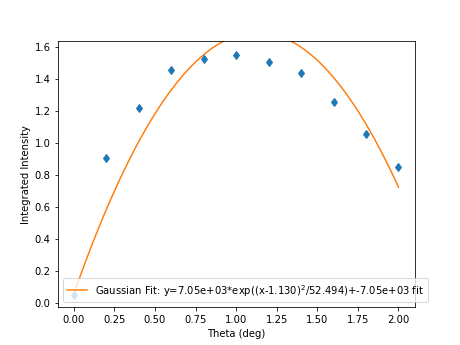
If you want to run an older scan, it’s also possible to select the saved results of a scan file and load it instead.
>>> fit = last_scan("mock_scan_02.dat").fit(Gaussian, save="replay2.png")
>>> abs(fit["center"] - 1.1) < fit["center_err"]
True

Perform complex scans
Some uses need more complicated measurements that just a simple scan over a single axis. These more complicated commands may need some initial coaching from the beamline scientist, but should be simple enough for the user to modify them without assistance.
>>> th= scan(theta, start=0, stop=1, stride=0.3)The above command does not contain a time command, so it does not run the full scan command. Instead, it merely creates a scan object, which is then stored in the
thvariable.To start with, a user may want to scan theta and two theta together in lock step.
>>> two_th= scan(two_theta, start=0, stop=2, stride=0.6)
>>> (th& two_th).plot(frames=10, save="locked.png")
Taking a count at theta=0.00 and two theta=0.00
Taking a count at theta=0.25 and two theta=0.50
Taking a count at theta=0.50 and two theta=1.00
Taking a count at theta=0.75 and two theta=1.50
Taking a count at theta=1.00 and two theta=2.00
On the other hand, if the user is unsure about the proper sample alignment, they may want to investigate theta and two-theta separately
>>> th = scan(theta, start=0, stop=12, stride=0.5)
>>> two_th = scan(two_theta, start=0, stop=2, stride=0.5)
>>> (th * two_th).plot(frames=5, save="2d.png") # doctest: +ELLIPSIS
Taking a count at theta=0.00 and two theta=0.00
Taking a count at theta=0.00 and two theta=0.50
Taking a count at theta=0.00 and two theta=1.00
Taking a count at theta=0.00 and two theta=1.50
Taking a count at theta=0.00 and two theta=2.00
Taking a count at theta=0.50 and two theta=0.00
Taking a count at theta=0.50 and two theta=0.50
Taking a count at theta=0.50 and two theta=1.00
Taking a count at theta=0.50 and two theta=1.50
Taking a count at theta=0.50 and two theta=2.00
...
Taking a count at theta=11.50 and two theta=0.00
Taking a count at theta=11.50 and two theta=0.50
Taking a count at theta=11.50 and two theta=1.00
Taking a count at theta=11.50 and two theta=1.50
Taking a count at theta=11.50 and two theta=2.00
Taking a count at theta=12.00 and two theta=0.00
Taking a count at theta=12.00 and two theta=0.50
Taking a count at theta=12.00 and two theta=1.00
Taking a count at theta=12.00 and two theta=1.50
Taking a count at theta=12.00 and two theta=2.00
Two scans can also be run one after the other. If there are any overlapping points, then the measurement at that location will be performed twice and the results combined. This can allow for iterative scanning to improve statistics.
>>> two_theta(3.0)
>>> th = scan(theta, start=0, stop=1, stride=0.5)
>>> (th + th + th).plot(frames=5)
Taking a count at theta=0.00 and two theta=3.00
Taking a count at theta=0.50 and two theta=3.00
Taking a count at theta=1.00 and two theta=3.00
Taking a count at theta=0.00 and two theta=3.00
Taking a count at theta=0.50 and two theta=3.00
Taking a count at theta=1.00 and two theta=3.00
Taking a count at theta=0.00 and two theta=3.00
Taking a count at theta=0.50 and two theta=3.00
Taking a count at theta=1.00 and two theta=3.00
A scan can also be run in the reverse direction, if desired.
>>> th.reverse.plot(frames=5)
Taking a count at theta=1.00 and two theta=3.00
Taking a count at theta=0.50 and two theta=3.00
Taking a count at theta=0.00 and two theta=3.00
To minimise motor movement, a scan can turn around at its end and run backwards to collect more statistics
>>> th.and_back.plot(frames=5)
Taking a count at theta=0.00 and two theta=3.00
Taking a count at theta=0.50 and two theta=3.00
Taking a count at theta=1.00 and two theta=3.00
Taking a count at theta=1.00 and two theta=3.00
Taking a count at theta=0.50 and two theta=3.00
Taking a count at theta=0.00 and two theta=3.00
For a more interactive experience, a scan be set to cycle forever, improving the statistics until the use manually kills the scan.
>>> scan(theta, start=0, stop=1, stride=0.5).forever.fit(Gaussian, frames=5) #doctest: +SKIP
Scan Alternate Detectors
The scan command, by default, scans an intensity on a detector that has been chosen by the instrument scientist. It is possible to scan other detectors through the detector keyword.
>>> scan(theta, start=0, stop=1, stride=0.25, frames=50, detector=specific_spectra([[4]]))
Taking a count at theta=0.00 and two theta=3.00
Taking a count at theta=0.25 and two theta=3.00
Taking a count at theta=0.50 and two theta=3.00
Taking a count at theta=0.75 and two theta=3.00
Taking a count at theta=1.00 and two theta=3.00
The above uses the
detector.specific_spectra()to create adetector.DetectorManagerthat looks at spectrum number four. Multiple channels can be combined together into a single value by including them all within the inner list. For example, to plots detector spectra four and one combined:>>> scan(theta, start=0, stop=1, stride=0.25, frames=50, detector=specific_spectra([[4, 1]])) Taking a count at theta=0.00 and two theta=3.00 Taking a count at theta=0.25 and two theta=3.00 Taking a count at theta=0.50 and two theta=3.00 Taking a count at theta=0.75 and two theta=3.00 Taking a count at theta=1.00 and two theta=3.00It’s also possible to plot different curves simultaneously by adding more lists to be main list. The example below plots both the combined spectra 11 and 12 as well as a separate curve with detector spectrum 4.
>>> scan(theta, start=0, stop=1, stride=0.25, frames=50, detector=specific_spectra([[4, 11, 12], [4, 1]]))
Taking a count at theta=0.00 and two theta=3.00
Taking a count at theta=0.00 and two theta=3.00
Taking a count at theta=0.25 and two theta=3.00
Taking a count at theta=0.25 and two theta=3.00
Taking a count at theta=0.50 and two theta=3.00
Taking a count at theta=0.50 and two theta=3.00
Taking a count at theta=0.75 and two theta=3.00
Taking a count at theta=0.75 and two theta=3.00
Taking a count at theta=1.00 and two theta=3.00
Taking a count at theta=1.00 and two theta=3.00
Beyond using the
specific_spectrafunction, it’s also possible to scan across any arbitrary value. The code below with plots twice the current value of the theta motor (as an example).>>> def example_detector(acc, **kwargs): ... return (acc, Average(2*theta())) >>> scan(theta, start=0, stop=1, stride=0.25, frames=50, detector=example_detector)
Perform continuous scans
The scans library has some ability to perform continuous scans. That is, the motor will keep moving at a set speed while data is being taken. This is implemented by polling the motor for it’s position at a frequency (by default, 5Hz) while the move is in progress.
Continuous scans currently have some limitations - for example, they can only be combined with each other, and not with other non-continuous scans.
Instead of taking a set of points, a continuous scan takes a collection of
scans.ContinuousMoveobjects:>>> from general.scans.scans import ContinuousMove >>> ContinuousMove(start=-5, stop=5, speed=0.05) Continuous move from -5 to 5 at speed 0.05When using continuous scans, the detector function should ideally return quickly. For example, reading the value of a block is suitable, but beginning a run is unlikely to be suitable except for very slow scans.
Continuous scans can be combined with each other (using python’s + operator) and reversed using the .and_back property just like step scans. They can also be run forever using the .forever property. However, combinations of step and continuous scans are currently not implemented.
Estimate time
It’s not all that uncommon for users to find themselves setting an overnight run to perform while they sleep. Since they are usually writing these scripts around two in the morning, their arithemtic skills frequently fail. When the run terminates prematurely, the beam time is wasted. When the user underestimates the time that they’re requesting, they wake up to find that their measurements haven’t finished and they must use more beam time to finish their results.
Having the scan system perform estimates of the time required and the point of completion is a simple convenience to prevent these user headaches.
>>> scan(theta, start=0, stop=2.0, step=0.6).calculate(frames=50)
20.0
>>> scan(theta, start=0, stop=2.0, step=0.6).calculate(uamps=0.1)
36.0
>>> scan(theta, start=0, stop=2.0, step=0.6).calculate(hours=1.0)
14400.0
>>> scan(theta, start=0, stop=2.0, step=0.6).calculate(minutes=1.0)
240.0
>>> scan(theta, start=0, stop=2.0, step=0.6).calculate(seconds=5.0)
20.0
>>> needed = scan(theta, start=0, stop=2.0, step=0.6).calculate(frames=1000, time=True) #doctest: +SKIP The run would finish at 2017-07-17 20:06:24.600802 >>> print(needed) #doctest: +SKIP 400.0
SPEC compatibility
As a convenience to users with an x-ray background, the ascan and dscan from SPEC have been implemented on top of the scanning interface. The only major change is that negative times now represent a number of frames instead of a monitor count, since waiting for a monitor count is currently unsupported.
>>> ascan(theta, 0, 2, 10, 1)
Taking a count at theta=0.00 and two theta=3.00
Taking a count at theta=0.20 and two theta=3.00
Taking a count at theta=0.40 and two theta=3.00
Taking a count at theta=0.60 and two theta=3.00
Taking a count at theta=0.80 and two theta=3.00
Taking a count at theta=1.00 and two theta=3.00
Taking a count at theta=1.20 and two theta=3.00
Taking a count at theta=1.40 and two theta=3.00
Taking a count at theta=1.60 and two theta=3.00
Taking a count at theta=1.80 and two theta=3.00
Taking a count at theta=2.00 and two theta=3.00
>>> theta(0.5)
>>> dscan(theta, -1, 1, 10, -50)
Traceback (most recent call last):
    ...
RuntimeError: Position -0.5 is below lower limit 0 of motor Theta
>>> theta(2.5)
>>> dscan(theta, -1, 1, 10, -50)
Taking a count at theta=1.50 and two theta=3.00
Taking a count at theta=1.70 and two theta=3.00
Taking a count at theta=1.90 and two theta=3.00
Taking a count at theta=2.10 and two theta=3.00
Taking a count at theta=2.30 and two theta=3.00
Taking a count at theta=2.50 and two theta=3.00
Taking a count at theta=2.70 and two theta=3.00
Taking a count at theta=2.90 and two theta=3.00
Taking a count at theta=3.10 and two theta=3.00
Taking a count at theta=3.30 and two theta=3.00
Taking a count at theta=3.50 and two theta=3.00
>>> theta
Theta is at 2.5
Position Commands
The user needs to give three of the following keyword arguments to create a scan.
start: This is the initial position of the scan. Fnord stop: This is the final position of the scan. The type of step chosen determines whether or not this final value is guaranteed to be included in the final measurement. before: This sets the initial position relative to the current position. after: This sets the final position relative to the current position. count: The total number of measurements to perform. This parameter always take precedence over “gaps” gaps: The number steps to take. The total number of measurements is always one greater than the number of gaps. stride: A requested, but not mandatory, step size. Users often know the range over which they wish to scan and their desired scanning resolution. stridemeasured the entire range, but may increase the resolution to give equally spaced measurements.stridealways take precedence overstepstep: A mandatory step size. If the request measurement range is not an integer number of steps, the measurement will stop before the requested end. See the
util.get_points()function for more information on the parameters.
Class setup
The base class for the low level code is the
Scanclass. This ensures that any functionality added to this class or bugs fixed in its code propagate out to all callers of this library. Unfortunately, Python does not have a concept of interfaces, so we cannot force all children to have a set of defined functions. However, any subclasses ofScanmust contain the follow member functions:
map: Create a modified version of the scan based on a user supplied function. The original position of each point is fed as input to the function and the return value of the function is the new position. reverse: Create a copy of the scan that runs in the opposite direction. Reverse should be a property, since it takes no parameters __len__: Return the number of elements in the scan __iter__: Return an iterator that steps through the scan one position at a time, yielding the current position at each point. There are four default subclasses of Scan that should handle most of the requirements
- SimpleScan
- is the lowest level of the scan system. It requires a function which performs the desired action on each point, a list of points, and a name for the axis. At this time, all scans are combinations of simpleScans.
- SumScan
- runs two scans sequentially. These scans do not need to be on the same axes or even move the same number of axes.
- ProductScan
- performs every possible combination of positions for two different scans. This provides an alternative to nested loops.
- ParallelScan
- takes to scans and runs their actions together at each step. For example, if
a' was a scan over theta and `bwas a scan over two theta, thena && bwould scan each theta angle with its corresponding two theta.The base
Scanclass contains four useful member functions.
plot: The plotfunction goes to each position listed in the scan, takes a count, and plots it on an axis. The user can specify the counting command.measure: The measurefunction goes to each position in the in the scan and records a measurement. The function is passed a title which can include information about the current position in the scan.fit: Like plot, this function takes a single count at each position. It then fits it to the user supplied model and returns the fitted value. This could be anything from the peak position to the frequency of the curve.calculate: This function takes a desired measurement time at each point and, optionally, an approximated motor movement time. It returns an estimated duration for the scan and time of completion.
Design Goals
This is a proposal for an improved system for running scans on the instrument. The idea is to use
Scanobjects to represent the parts of the scan. These scan objects form an algebra, making them easier to compose than usingforloops. These scan objects are mainly intended as tools for the instrument scientists for creating a higher level interface that the users will interact with.We desire the following traits in the Scanning system
User simplicity
The users need to be able to perform simple scans without thinking about object orient programming or algebraic data types. Performing a basic scan should always be a one liner. Making modified versions of that scan should require learning a modification of that command and not an entirely new structure. Common, sensible user options should be available and sane defaults given.
The code should also take advantage of Python’s built in documentation system to allow for discoverability of all of the functionality of these scripts.
Composability
The code should trivially allow combining smaller scripts into a larger script. This ensures that, as long as the smaller scripts are bug free, the larger scripts will also be free of bugs by construction.
Functionality
The code should be able to perform all of the tasks that might involve scanning on the beamline, from the common place to the irregular.
- Plotting: It should be possible to plot any readback value as a function
- of any set of motor positions. Scans of multiple axes should be able to either plot multiple labelled lines or a 2D heatmap
- Measuring: Performing a full series of measurements should only be a
- minor modification of the plotting command
- Fitting: The user should be capable of performing fits on curves to
- extract values of interest. Common fitting routines should be a simple string while still accepting custom functions for exceptional circumstances
- Spacing: It should be possible to space points both linearly and
- logarithmically.
- Prediction: It should be possible to estimate the time needed for a scan
- before the scan is performed.